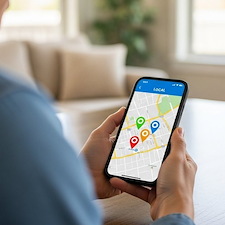
Google Just Handed AI the Keys to Your Business Profile. Read This Before You Use It.



Your Google Business Profile is the hardest working part of your marketing. It is the thing that shows up when someone types "roofer near me" or "emergency plumber" into Google at 11 at night. The map. The star rating. The little box with your phone number, your hours, and a button to call you.
Most contractors set it up once and never think about it again. That is not lazy. You are busy. After a ten hour day on a job site, updating your hours or writing back to a review is the last thing you want to do.
So when Google says you can hand that whole job to artificial intelligence with a single tap, it sounds like a gift.
Can You Really Let AI Manage Your Google Business Profile Now?
Yes. In June 2026, Google rolled out a way to connect your Google Business Profile to Gemini, its AI assistant, with one tap. Once linked, you can ask Gemini to pull your real performance numbers, draft replies to reviews in your voice, update your hours, and post updates - all in plain English. It is genuinely useful, but your profile is the one listing every future lead runs through, so the smart move is to let AI handle the drafts and grunt work while you keep the final say on anything that can get your listing flagged or make you look bad in public.
What Actually Happened With Google and Gemini
Here is what actually happened. In June 2026, Google announced that you can now connect your Google Business Profile to Gemini, its AI assistant, with one tap. Once it is linked, you can ask Gemini things in plain English. Ask it "how did my business do this month?" and it pulls your real numbers, like how many people saw you, called you, or asked for directions. Ask it to "help me respond to my latest review" and it writes a reply in your voice. Tell it to update your hours or post a holiday note, and it just does it.
It is rolling out around the world right now. And for once, small operators are near the front of the line instead of the back. You can read the specifics on Google's official Business Profile help before you connect anything.
Why "Set It and Forget It" Is a Trap Here
Sounds great, right? A lot of it is. But there is a part Google's big announcement skips over.
Your Business Profile is not a Facebook page. If something goes wrong with it, you do not just look a little sloppy. You can vanish from search.
Google is strict about business listings. Edit the wrong field, or change your name or address in a way that trips one of Google's filters, and your profile can get flagged. When that happens, it can go into a review process, or worse, get unverified. An unverified profile falls off the map. No map means no calls. No calls means no work. This is also why keeping your name, address, and phone number consistent matters more than most contractors realize.
AI is fast. It is also very confident when it is wrong. It will happily post something, change something, or reply to someone without the context you carry around in your head every day.
Now think about reviews for a second. A review reply is not busywork. It is public. Every future customer who reads your profile sees how you handle the unhappy ones. Say a homeowner leaves an angry review because a job ran two days long. A slick, generic AI reply can make you look worse, not better. It might even apologize for something that was not your fault, in writing, where everyone can see it. The tool does not know your side of the story. You do. If you are not sure how to handle the tough ones, a bad review is actually something you need online - handled the right way.
There is one more thing worth knowing. At launch, this only works if you manage a single profile. Big agencies and multi location brands are locked out for now. If you are a contractor with one location, that is good news. You are exactly who this was built for. But it also means the people using it often have nobody checking the work. It is just you and the AI, alone with your listing.
What to Let Gemini Do, and What to Keep
Here is a simple way to think about it. Treat Gemini like a sharp new assistant on their first week. Great for drafts and grunt work. Not ready to make the calls that can sink you.
Let it handle these:
- Pull your numbers. Asking "how did my profile do this month?" and getting a straight answer is genuinely useful. Most contractors never look at this data at all. If the AI gets you to actually check it, that alone is a win. You might find out most of your calls come from one service you barely advertise.
- Draft your review replies. Notice the word draft. Not post. Let it write the first version, then you read it, fix the tone, and hit send yourself. You get the speed without giving up your judgment. A ten second read before you post is cheap insurance.
- Spot the gaps. Gemini can flag that you are missing your holiday hours, or have not posted anything in months, or never answered a customer question. Those are good nudges. Filling those gaps helps you show up more often, and they take five minutes each once someone points them out.
The pattern with all three is the same. The AI does the boring first pass, and you keep the final say. You stay in control, you just stop doing the parts that were eating your evenings.
Keep your own hands on these:
- Any change to your core info. Double check anything it edits about your name, address, phone number, or business categories. These are the exact fields that get profiles suspended. Read the change before you approve it. Every time.
- Your categories and service areas. This is strategy, not data entry. Choosing "roofing contractor" versus "roofing service," or which towns you list as your service area, changes who finds you. That call is yours. The AI does not know your market or your best jobs.
- Final say on anything public. Reviews, posts, replies to questions. Let the AI write the draft. You approve it. No exceptions.
There is a bigger point under all of this. AI is good at the doing. It is not good at the deciding. Your profile ranks and gets calls because of choices: the right categories, real reviews from real jobs, an accurate service area, and steady activity. Gemini can help you move faster on the doing. It cannot make the decisions that actually get you found. That is the same reason good local SEO has never been a set-it-and-forget-it job.
Why This Matters More Than It Looks
Here is the thing that makes all of this worth your attention, even if you never tap that button.
Search itself is changing. When a homeowner asks an AI assistant for "a good HVAC company near me," that answer has to come from somewhere. It comes from your reviews. Your Business Profile. The same local signals that already mattered. So a clean, active, accurate profile is not just about the map anymore. It is feeding the machine that decides who gets recommended in the first place.
That means your profile matters more than ever, not less.
Ten years ago a homeowner might have found you through a phone book or a yard sign. Today they find you through a search box, and tomorrow they will find you by asking an assistant that reads your profile for them. Every one of those roads runs through the same listing. And the last thing you want is an AI quietly making a mess of the one thing all your future leads depend on. If you want the fuller picture, here is the right way to get more leads for contractors.
So use the new tools. They are genuinely helpful, and they can save you real time. Just do not hand over the wheel and take a nap.
Not sure what your profile should say, or nervous about letting AI near it? That is the part we handle every day. Footbridge Media manages Google Business Profiles for contractors across the country as part of our contractor marketing program. We keep the categories right, the reviews answered, and the listing safe, so the phone keeps ringing. Reach out for a free look at your profile before you let anything, human or AI, start making changes.
Frequently Asked Questions
It can be, as long as you do not hand it the wheel completely. Use Gemini to draft review replies, pull your performance numbers, and spot gaps in your listing. But read and approve anything it changes about your name, address, phone number, categories, or anything that posts publicly. Those are the exact fields that get profiles flagged or unverified, so a human should always have the final say.
Gemini can draft a reply in your voice, and that is a real time-saver. What it should not do is post that reply without you reading it first. Review replies are public and permanent. A generic AI response can apologize for something that was not your fault or miss context only you have. Let it write the draft, then take ten seconds to read it and hit send yourself.
Yes. Google is strict about business listings. Changing your name or address in a way that trips one of Google's filters can send your profile into a review process or get it unverified, and an unverified profile falls off the map. That is why you want to double-check any core-info edit before you approve it, whether it came from you or from an AI.
It matters more, not less. When a homeowner asks an AI assistant for "a good HVAC company near me," the answer is built from your reviews and your Business Profile - the same local signals that already mattered. A clean, active, accurate profile now feeds the machine that decides who gets recommended in the first place.
At launch, the one-tap connection only works if you manage a single profile. Big agencies and multi-location brands are locked out for now. If you are a contractor with one location, you are exactly who this was built for - just remember that means nobody else is checking the AI's work but you.

About Aaron O'Hanlon
Aaron O'Hanlon is the CEO and Co-Founder of Footbridge Media, a digital marketing agency, specializing in the contracting industry. It is his mission to create awareness of marketing online to the home improvement industry and to educate, inform, and assist contractors in taking over their own online presence.